Destructuring
Destructuring assignment
Data structure 2 ตัวที่ใช้งานได้มากที่สุด คือ Array และ Object
- Object ทำให้เราสามารถสร้างสิ่งที่เก็บข้อมูลโดย key ได้
- Array ทำให้เราสามารถเก็บข้อมูลหลาย ๆ ตัว เรียงกันไว้ได้
อย่างไรก็ตาม เมื่อเราส่งข้อมูลเข้าไปใน function บางทีเราอาจไม่ต้องการข้อมูลทั้งหมดของมัน เช่น มันอาจต้องการแค่ข้อมูลเดียว หรือ property ตัวเดียว
Destructuring assignment เป็น syntax พิเศษที่ช่วยทำให้ “unpack” Array หรือ Object ให้เป็นข้อมูลที่ใช้งานได้ง่ายมากขึ้น
Destructuring ก็สามารถทำงานได้ดีกับ function ที่มี่หลาย parameter, default values, และ อื่น ๆ
Array destructuring
ตัวอย่างในการ destructured array เป็นตัวแปร
// we have an array with a name and surname
let arr = ["John", "Smith"]

// destructuring assignment
// sets firstName = arr[0]
// and surname = arr[1]
let [firstName, surname] = arr;

alert(firstName); // John
alert(surname);  // Smith
ตอนนี้ เราสามารถใช้งานตัวแปร จากสมาชิกของ Array ได้
คราวนี้ เราลองมาใช้กับ split method หรือ Array method อื่น ๆ
let [firstName, surname] = "John Smith".split(' ');
alert(firstName); // John
alert(surname);  // Smith
อย่างที่คุณเห็น มันสามารถใช้งานได้ง่ายมาก แต่มันยังมีรายละเอียดลึกกว่านี้อีกนิดหน่อย
The rest ‘…’
โดยปกติแล้ว ถ้า Array มีมากกว่าตัวแปรที่จะรับ
ตัวอย่างเช่น โค้ดด้านล่างนี้ มีแค่ 2 ตัวที่ได้รับ และตัวที่เหลือถูกละเว้น
let [name1, name2] = ["Julius", "Caesar", "Consul", "of the Roman Republic"];

alert(name1); // Julius
alert(name2); // Caesar
// Further items aren't assigned anywhere
ถ้าเราต้องการตัวที่เหลือมาด้วย - เราสามารถเพิ่มตัวแปรอีกตัวนึงได้ เพื่อรับค่าที่เหลือทั้งหมดมา โดยการใช้จุดสามจุด "...":
let [name1, name2, ...rest] = ["Julius", "Caesar", "Consul", "of the Roman Republic"];

// rest is an array of items, starting from the 3rd one
alert(rest[0]); // Consul
alert(rest[1]); // of the Roman Republic
alert(rest.length); // 2
ค่าของ rest จะเป็นค่าที่เหลือของ element ที่เหลือ
เราสามารถใช้ชื่ออื่น แทนการใช้ rest ได้ ทำให้มั่นใจว่าจุดสามจุดอยู่หน้าชื่อตัวแปร
let [name1, name2, ...titles] = ["Julius", "Caesar", "Consul", "of the Roman Republic"];
// now titles = ["Consul", "of the Roman Republic"]
Default values
ถ้า Array มีน้อยกว่าตัวที่เราจะรอรับทางด้านซ้าย มันจะไม่มี Error แต่มันจะเป็น undefined แทน
let [firstName, surname] = [];

alert(firstName); // undefined
alert(surname); // undefined
ถ้าเราต้องการค่า “default” เพื่อกำหนดค่าเริ่มต้นของตัวที่ไม่ได้กำหนดค่า เราสามารถใช้ = ในการกำหนดได้
// default values
let [name = "Guest", surname = "Anonymous"] = ["Julius"];

alert(name);    // Julius (from array)
alert(surname); // Anonymous (default used)
ค่าเริ่มต้น สามารถซับซ้อนกว่านี้ได้ หรือ สามารถเรียกใช้ function
ตัวอย่างเช่น เราสามารถใช้ prompt ในการกำหนดค่าเริ่มต้นได้
// runs only prompt for surname
let [name = prompt('name?'), surname = prompt('surname?')] = ["Julius"];

alert(name);    // Julius (from array)
alert(surname); // whatever prompt gets
จำไว้ว่า prompt จะทำงานแค่เมื่อค่านั้น เป็นค่าที่หายไป (surname).
Object destructuring
destructuring assignment ก็สามารถทำงานกับ Object ได้เหมือนกัน
syntax อย่างง่าย
let {var1, var2} = {var1:…, var2:…}
โดยเราจะมี Object อยู่ด้านขวา และแบ่งเข้าไปในตัวแปรแต่ละตัว โดยด้านซ้ายเก็บค่าเป็น “pattern” เรียงตาม ชื่อที่เหมือนกัน
ตัวอย่างเช่น
let options = {
  title: "Menu",
  width: 100,
  height: 200
};

let {title, width, height} = options;

alert(title);  // Menu
alert(width);  // 100
alert(height); // 200
การเรียงลำดับไม่จำเป็น เพราะมันจะเก็บค่าเข้าตัวแปร ที่มีชื่อเหมือนกัน
// changed the order in let {...}
let {height, width, title} = { title: "Menu", height: 200, width: 100 }
pattern ทางด้านซ้ายจะ map ระหว่าง property และ variable เข้าด้วยกัน
ถ้าเราต้องการจะกำหนดค่าเข้าไปที่ตัวแปรที่มีชื่อต่างจากตัวเดิม เช่น options.width เข้าไปตัวแปร w ในกรณีนั้นเราสามารถตั้งชื่อตัวแปรโดยใช้ colon ได้
let options = {
  title: "Menu",
  width: 100,
  height: 200
};

// { sourceProperty: targetVariable }
let {width: w, height: h, title} = options;

// width -> w
// height -> h
// title -> title

alert(title);  // Menu
alert(w);      // 100
alert(h);      // 200
colon แสดงถึง “จาก: ไปที่” ตัวอย่างเช่น จาก property width ไปที่ w , property height ไปที่ h, และ title กำหนดไปที่ตัวแปรที่มีชื่อเดียวกัน
ในกรณีที่มีตัวที่ไม่มีค่า เราสามารถใช้ "=" ในการกำหนดค่าเริ่มต้นได้
let options = {
  title: "Menu"
};

let {width = 100, height = 200, title} = options;

alert(title);  // Menu
alert(width);  // 100
alert(height); // 200
เหมือนกับ Array เราสามารถดึงค่าจาก function มาเป็นค่าเริ่มต้นได้
ในตัวอย่างข้างล่าง prompt จะถาม width แต่จะไม่ถาม title
let options = {
  title: "Menu"
};

let {width = prompt("width?"), title = prompt("title?")} = options;

alert(title);  // Menu
alert(width);  // (whatever the result of prompt is)
เราสามารถรวมการใช้ colon และการกำหนดค่าเริ่มต้นได้
let options = {
  title: "Menu"
};

let {width: w = 100, height: h = 200, title} = options;

alert(title);  // Menu
alert(w);      // 100
alert(h);      // 200
ถ้าเราต้องการจะใช้แค่ตัวเดียว เราก็สามารถเลือกกำหนดแค่ตัวเดียวได้
let options = {
  title: "Menu",
  width: 100,
  height: 200
};

// only extract title as a variable
let { title } = options;

alert(title); // Menu
The rest pattern “…”
จะเกิดอะไรขึ้นเมื่อเรามี properties มากกว่าที่เราจะรับ เราสามารถจะใช้ “rest” ได้หรือไม่
เราสามารถใช้ “rest” ได้เหมือนกับ Array เลย แต่ว่าบาง Browser อาจจะไม่ซัพพอร์ต แต่ Browser สมัยใหม่รับรอง
let options = {
  title: "Menu",
  height: 200,
  width: 100
};

// title = property named title
// rest = object with the rest of properties
let {title, ...rest} = options;

// now title="Menu", rest={height: 200, width: 100}
alert(rest.height);  // 200
alert(rest.width);   // 100
Nested destructuring
ถ้า Object หรือ Array เก็บค่าที่เป็น Object หรือ Array ซ้อนไว้ เราสามารถใช้การกำหนดค่าที่ซับซ้อนขึ้นได้ เพื่อการกำหนดค่าที่ลึกขึ้น
ในโค้ดด้านล่าง options มี Object อยู่ใน proerty size และมี Array ใน property items โดยโครงสร้างของตัวแปรใหม่ต้องคล้าย ๆ กับ โครงสร้างตัวเก่า
 let options = {
  size: {
    width: 100,
    height: 200
  },
  items: ["Cake", "Donut"],
  extra: true
};

// destructuring assignment split in multiple lines for clarity
let {
  size: { // put size here
    width,
    height
  },
  items: [item1, item2], // assign items here
  title = "Menu" // not present in the object (default value is used)
} = options;

alert(title);  // Menu
alert(width);  // 100
alert(height); // 200
alert(item1);  // Cake
alert(item2);  // Donut
ตัวแปรทั้งหมดของ option ถูกกำหนดเข้าไปในตัวแปรใหม่ ยกเว้น extra ที่ไม่ได้รับค่าเข้ามา
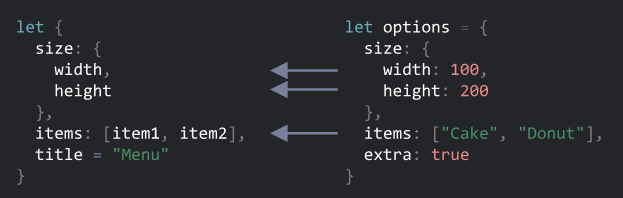
สุดท้ายนี้ เรามีตัวแปร width, height, item1, item2 และ title จากค่าของ option
โปรดจำไว้ว่า ไม่มีตัวแปรให้กับ size และ items
Smart function parameters
สมมติว่าเรามี function หนึ่งใช้สร้าง menu ขึ้นมา โดยรับ parameter เข้ามาเป็น width, height, title และ item list และอื่น ๆ
นี่เป็นวิธีที่ค่อนข้างแย่ในการเขียน function
function showMenu(title = "Untitled", width = 200, height = 100, items = []) {
  // ...
}
ในการทำงานจริง เราอาจลืมการเรียงลำดับของ arguments หรือไม่ IDE ที่เราใช้ อาจจะช่วยเรา แต่อีกปัญหานึงเมื่อเราส่งค่าเข้าไปใน function และเราไม่ต้องการจะใส่ค่าบางค่าเข้าไป เราจะทำอย่างไร
อย่างนี้หรอ?
// undefined where default values are fine
showMenu("My Menu", undefined, undefined, ["Item1", "Item2"])
นั่นค่อนข้างดูไม่ดี และอ่านยากมาก เมื่อเราต้องรับกับการส่งค่า parameter หลาย ๆ ตัว
การ Destructuring จะเข้ามาช่วยในการทำงานเราให้ง่ายขึ้น
เราสามารถส่ง parameter ที่เป็น Object เข้าไปได้ และ มันจะ destructurizes เป็นตัวแปรให้
// we pass object to function
let options = {
  title: "My menu",
  items: ["Item1", "Item2"]
};

// ...and it immediately expands it to variables
function showMenu({title = "Untitled", width = 200, height = 100, items = []}) {
  // title, items – taken from options,
  // width, height – defaults used
  alert( `${title} ${width} ${height}` ); // My Menu 200 100
  alert( items ); // Item1, Item2
}

showMenu(options);
เราสามารถใช้การ destructuring ที่ซับซ้อนกว่านี้ได้ โดยการใช้ colon :
let options = {
  title: "My menu",
  items: ["Item1", "Item2"]
};

function showMenu({
  title = "Untitled",
  width: w = 100,  // width goes to w
  height: h = 200, // height goes to h
  items: [item1, item2] // items first element goes to item1, second to item2
}) {
  alert( `${title} ${w} ${h}` ); // My Menu 100 200
  alert( item1 ); // Item1
  alert( item2 ); // Item2
}

showMenu(options);
รูปแบบของ syntax แบบเต็ม ๆ เขียนแบบนี้
function({
  incomingProperty: varName = defaultValue
  ...
})
ดังนั้น สำหรับ parameter ที่เป็น Object เราจะใช้ตัวแปร varName สำหรับ incomingProperty โดยมี defaultValue เป็นค่าเริ่มต้น
โปรดจำไว้ว่า showMenu() จะต้องมี argument ถึงแม้เราจะกำหนดค่าเริ่มต้นหมดแล้ว แต่เราก็ต้องใส่ตัวแปรลงไปอยู่ดี โดยถ้าเราไม่อยากใส่ค่าอะไรลงไป เราก็แค่ใส่ Object เปล่าลงไป
showMenu({}); // ok, all values are default

showMenu(); // this would give an error
เราสามารถแก้ไขได้โดย ทำให้ทั้งก้อน มีค่าเริ่มต้นเป็น Object เปล่า
function showMenu({ title = "Menu", width = 100, height = 200 } = {}) {
  alert( `${title} ${width} ${height}` );
}

showMenu(); // Menu 100 200
Summary
-
Destructuring สามารถทำให้เรา Map ตัวแปรจาก Object หรือ Array เข้าไปในตัวแปรได้
-
รูปแบบ syntax เต็ม ๆ ของ Object
let {prop : varName = defaultValue, ...rest} = objectนี่แปลว่า ตัวแปร
propจากobjectจะไปเป็นค่าของvarNameและถ้าค่านั้นไม่มีอยู่ มันจะใช้ค่าdefaultValueจะถูกใช้ และ properties ของobjectที่เหลือ จะเข้าไปอยู่ในตัวแปรrest -
รูปแบบ syntax เต็ม ๆ ของ Array
let [item1 = defaultValue, item2, ...rest] = arrayelement ตัวแรก เข้าไปที่
item1ตัวที่สองเข้าไปที่item2และตัวที่เหลือเข้าไปที่rest -
มันเป็นไปได้ที่เราจะคัดลอกค่าจาก nested arrays/objects, แต่ว่าโครงสร้างจะต้องเหมือนกับตัวที่ต้องการจะคัดลอก